
Product
Every load, truck and dollar. One live picture.
Haulbeam connects the systems you already run and turns them into one operation your whole team can act on — owners, dispatch, billing, safety and drivers.
How it works
- 01Connect what you runTMS, ERP, ELD and reefer telematics, EDI partners, warehouse, maintenance, fuel cards, driver files, the customer-service mailbox. Or upload exports.
- 02One live pictureEvery record is cleaned and linked — load, stops, truck, driver, invoice, evidence — and every figure opens its source.
- 03Needs you now16 alert rules surface what needs a person, with the reason and the next step.
- 04Act with approvalHaulbeam drafts the e-mail, the EDI 214 or the 990. A person approves, then it goes out.
- 05Ask“Where is PO 4500018842?” Answers come from your records and show which ones were used.
- 06Get paidMoney Desk runs 26 rules for detention, accessorials, short pays and invoice gaps — each with evidence.
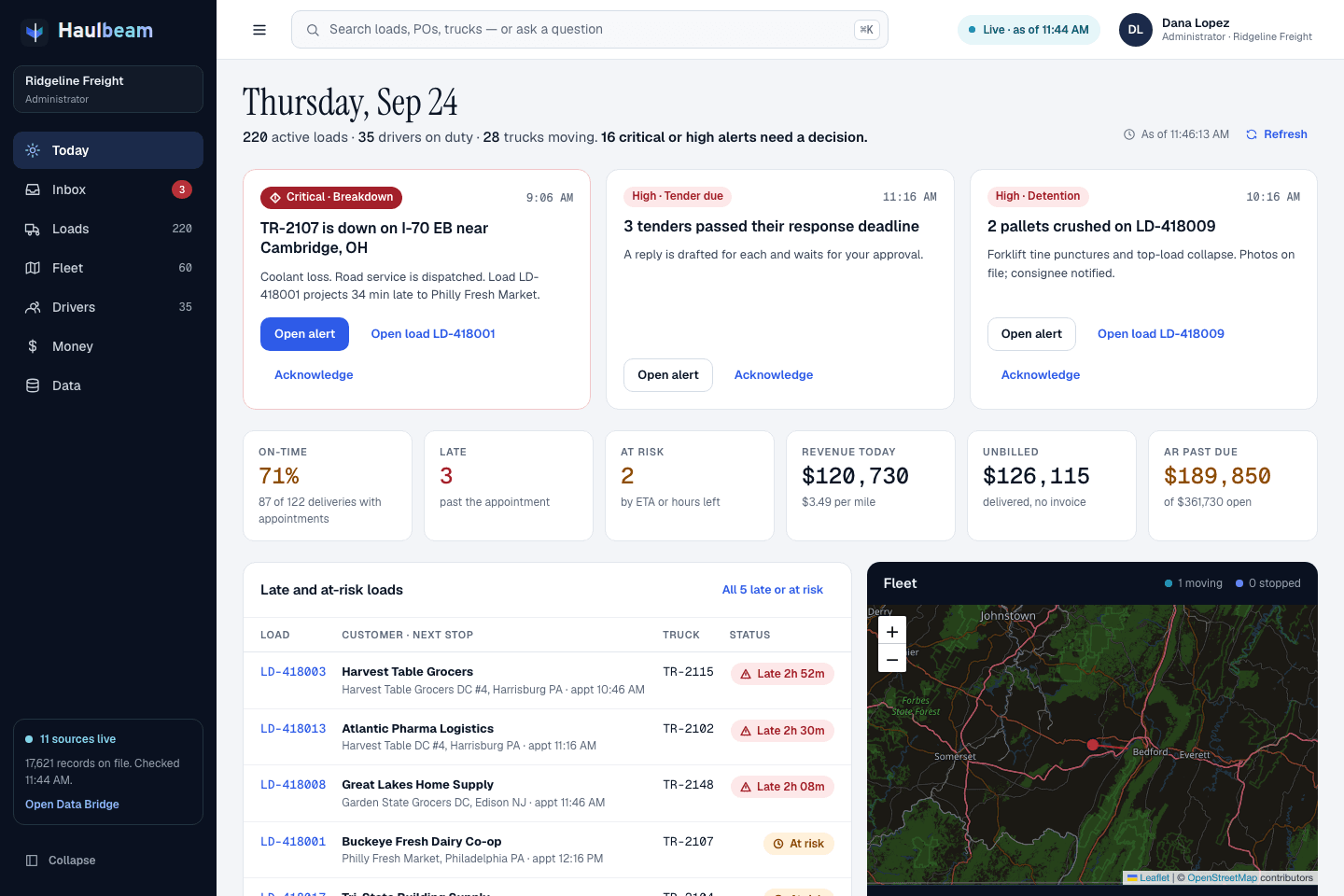
Today · command center
What needs a decision, first.
Open Haulbeam and the day is already sorted: the few things that need a person right now, each with the action on the card — then the numbers that tell you how the day is going.
ForOwner · GM · COO
- Needs you now. Critical and high alerts as decision cards: what happened, when, and the button that fixes it.
- Six numbers that matter: on-time %, late, at risk, revenue today, unbilled and AR past due.
- Late and at-risk loads with the reason in plain words — “ETA after the appointment window”, “57 min of drive time left”.
- Data freshness you can see. How many sources are live and when each was last checked.
16 alert rules, including
- Breakdowns
- Late appointments
- Hours-of-service shortfalls
- Reefer temperature
- Detention
- Tenders due
- Tracking gaps
- Credit holds
- Damage (OS&D)
- Expiring credentials
- Maintenance overdue
- Urgent customer e-mails
Loads & dispatch
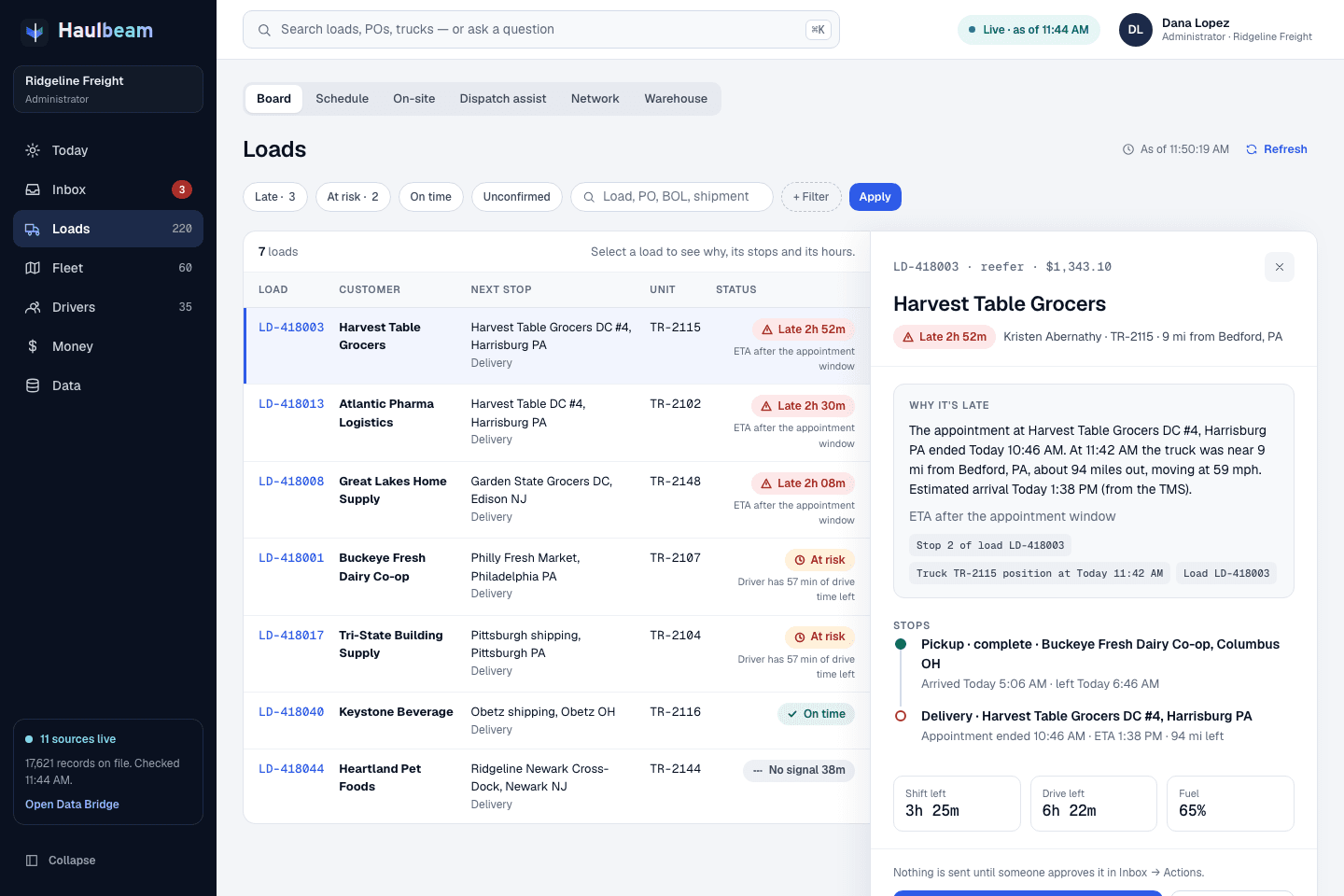
Why it’s late — with the evidence.
One board for every load, filtered the way dispatch thinks: late, at risk, on time, unconfirmed. Open a load and Haulbeam tells you why, shows the records behind it, and lines up the next move.
ForDispatch
- “Why it’s late” in a sentence, with record chips for the stop, the truck position and the load.
- Stops timeline with arrivals, departures, appointments and miles left, plus the driver’s shift, drive time and fuel.
- On-site and detention board, schedule, dispatch assist and driver messages — one click apart.
- Customer e-mail inbox tied to the loads each message is about.
- Status is never color alone: “Late 2h 52m”, “At risk”, “On time”, “No signal 38m”.
Fleet & drivers
Every truck. Every driver. Every expiration.
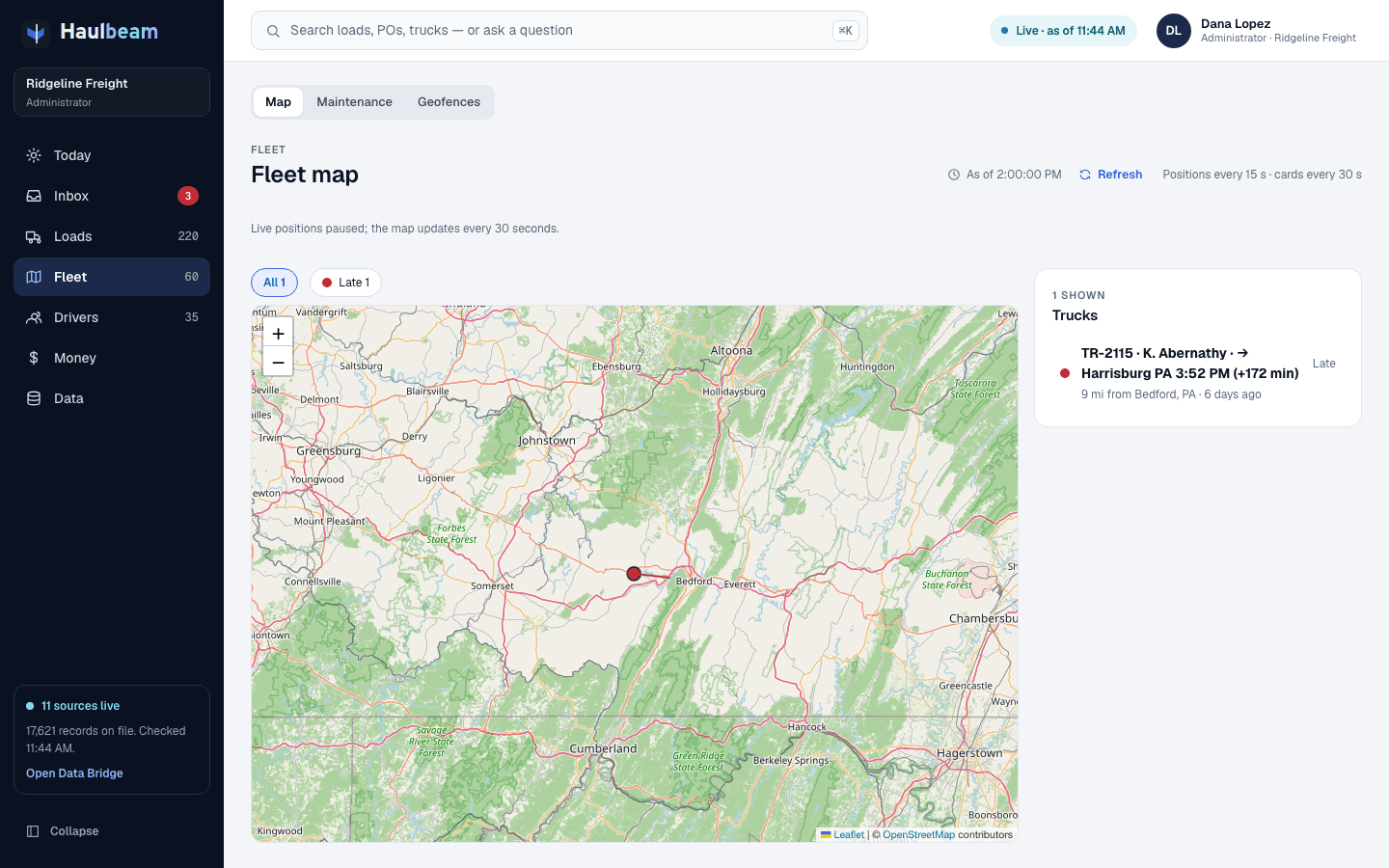
A live map where late trucks stand out, and the compliance work that keeps them rolling — without another spreadsheet.
ForDispatch · Safety · Compliance
- Live fleet map with late trucks called out, where they are headed and how far behind.
- Drivers and hours of service with shortfall warnings before a load is at risk.
- Expiring credentials flagged before they take a driver off the road.
- Maintenance due and overdue, and OS&D claims with photos.
- Geofences around the places that matter to your operation.
Haulbeam is not an ELD and not your hours-of-service record of legal truth — your ELD is. Haulbeam reads it.
Money Desk
26 rules that find money you already earned.
Money Desk checks delivered loads against customer terms, rate confirmations, driver-app arrival times and paperwork. Every finding comes with its evidence, ready for billing.
What the rules look for
Built for billing, AR and accounting
Illustration · simulated carrier · not customer data
Haulbeam Watch
Watch keeps checking after the office goes home.
Watch reads your records and finds money and operating problems: money you’re owed, money you’re losing, ways to save, service at risk and gaps that hide money. Every number is worked out from your records, and nothing is sent until someone approves it.
When Watch looks
- Every time new records come in
- Every 15 minutes, 6 am to 8 pm, Monday to Saturday
- A deep pass at 3 am
- A Money & Ops brief every morning at 6, and a weekly one on Monday
Where you see it
On Today, in Money → Haulbeam Watch, and in Inbox → Insights.
What the recording shows
Screen recording of the Haulbeam web app with a simulated carrier, Ridgeline Freight. It moves from the Loads board to the Today screen, where the Haulbeam Watch card shows what Watch found this week, split into data that hides money, losing money, missing money, ways to save and service risk, with its top three items. It then opens the Watch page, with what Watch found this week, how many findings are open and the list of findings by kind. One finding, “Detention you earned but did not bill”, shows the formula for one stop worked out from the arrival, appointment and departure times and the customer’s free time and hourly rate, the stop records behind it, what to do, an integrity check that passed, what to measure, and a button that prepares the detention charges for approval.
What Watch looks for
- Missing money
Detention, stop-offs, lumpers and fuel surcharge never billed. Short pays. Loads delivered but not invoiced. Loads turned down while trucks sat idle.
- Losing money
Customers and loads that lose money. Fuel bought above your usual price. Docks that keep trucks waiting. Fuel-card purchases that don’t add up.
- Ways to save
Empty miles, idling, and part-loads that would fit in one trailer.
- Service risk
On-time below target, and where it clusters. Loads that can’t make the next stop on the hours left. Freight moving for customers on credit hold.
- Data that hides money
Records that keep money out of sight — like carrier pay never entered on a brokered load, so the margin looks better than it is.
Every finding comes with
- The reason, with the formula worked out from your own records.
- The money at stake, and how sure Watch is: worked out, partly estimated or an estimate.
- The records behind it, each one a click away.
- What to do next. When there’s a charge or a message to send, a button prepares the drafts — nothing goes out until a person approves.
- An integrity check. Safety, hours of service and other legal rules, customer commitments, drivers’ fair pay and honest records are never traded for a saving.
- What to measure, so a saving counts only when the number actually moves.
Assistant & approvals
AI you can check. Nothing sent unapproved.
Search or ask from any screen with ⌘K. The assistant answers from your company’s own records and shows which ones it used. When it drafts something, it waits for a person.
ForEveryone in the office
- Cited answers. “Where is PO 4500018842?” comes back with the load, stop and truck position behind it.
- “Unconfirmed” when data is missing — never a confident guess.
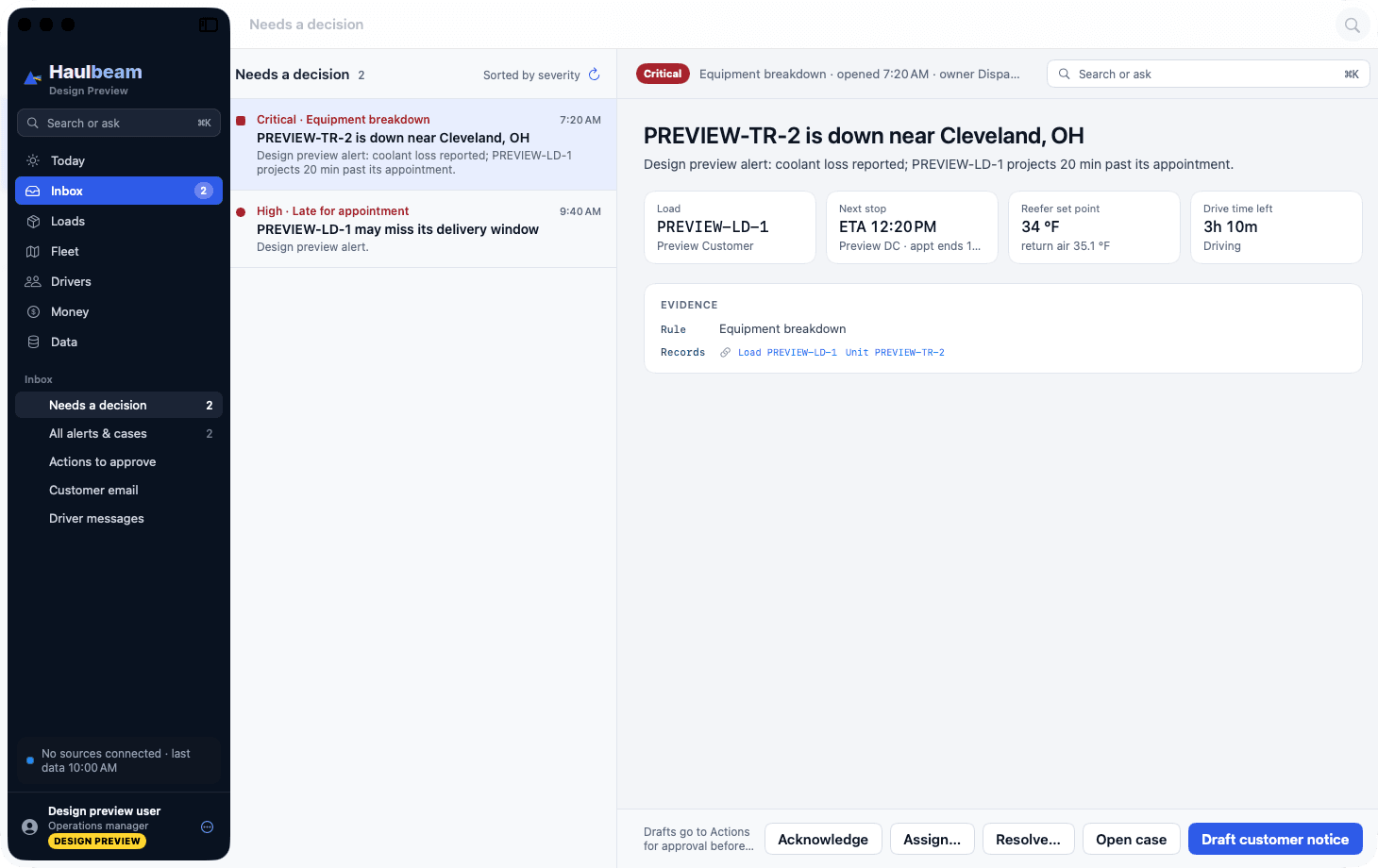
- Drafts, not sends: the customer e-mail, the EDI 214 status, the 990 tender response or the webhook. A person approves in Inbox → Actions, then it is delivered.
- Inbox triage on web, Windows and Mac: needs a decision, all alerts and cases, actions to approve, customer e-mail, driver messages.
AI answers can be wrong. Everything important is cited and approval-gated.
Mac app shown with design-preview sample data
Why it’s late
The appointment at Harvest Table Grocers DC #4, Harrisburg PA ended today at 10:46 AM. At 11:42 AM the truck was about 9 mi from Bedford, PA — roughly 94 miles out, moving at 59 mph. Estimated arrival 1:38 PM (from the TMS).
Checked against
Haulbeam Driver · iPhone
Built for the cab. Respectful of the driver.
A driver app that replaces calls and paperwork — and never tracks anyone off duty.
- Activation code and PIN from the company, with Face ID after that.
- On-duty-only location with a visible “tracking on” pill. Off duty means off.
- Automatic arrival and departure with detention timers at every stop.
- Documents and proof of delivery by photo.
- Messages with dispatch, read aloud and held while driving; the screen locks in driving mode.
- Safety and emergency one tap away.
- “What my company sees” — the driver can always check exactly what the office can see.
The driver’s ELD remains the legal hours-of-service record.
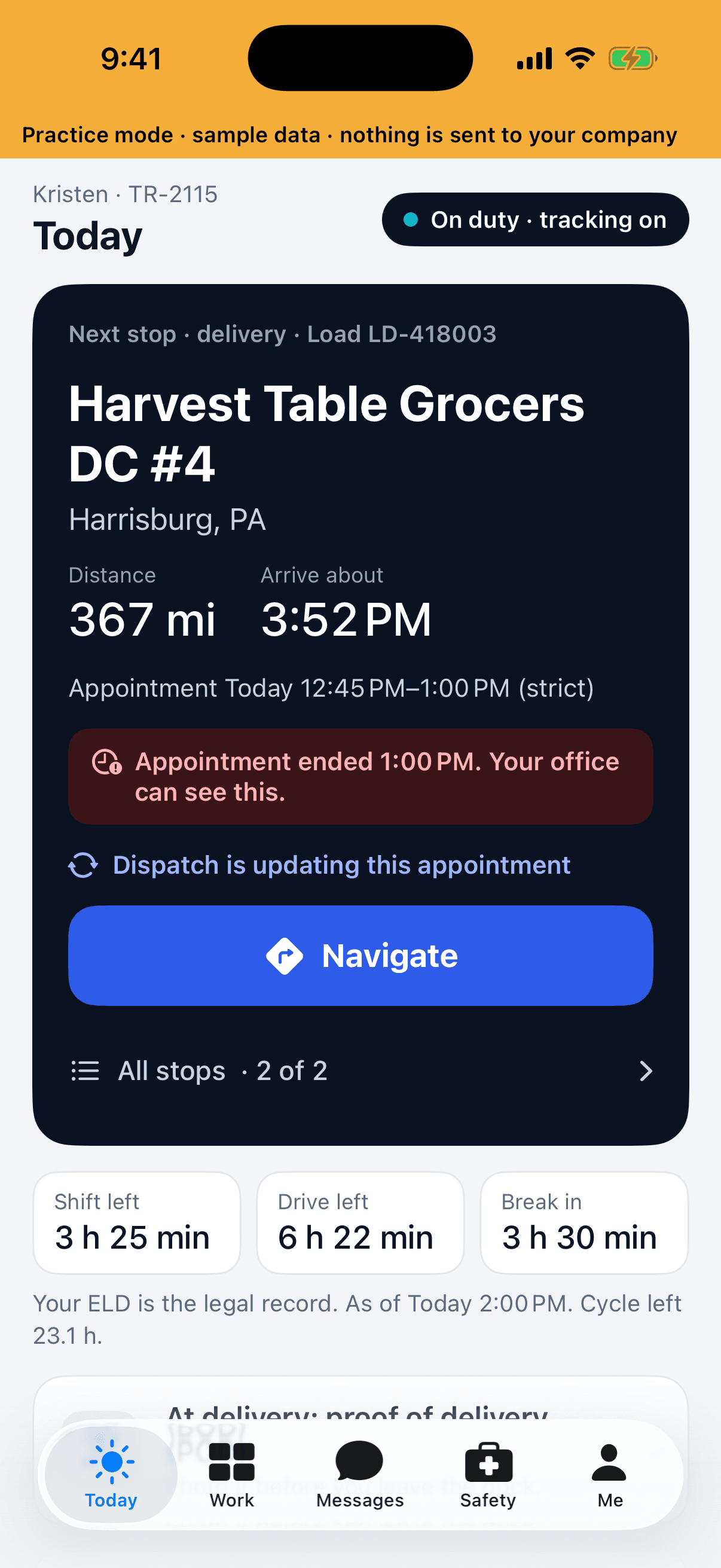
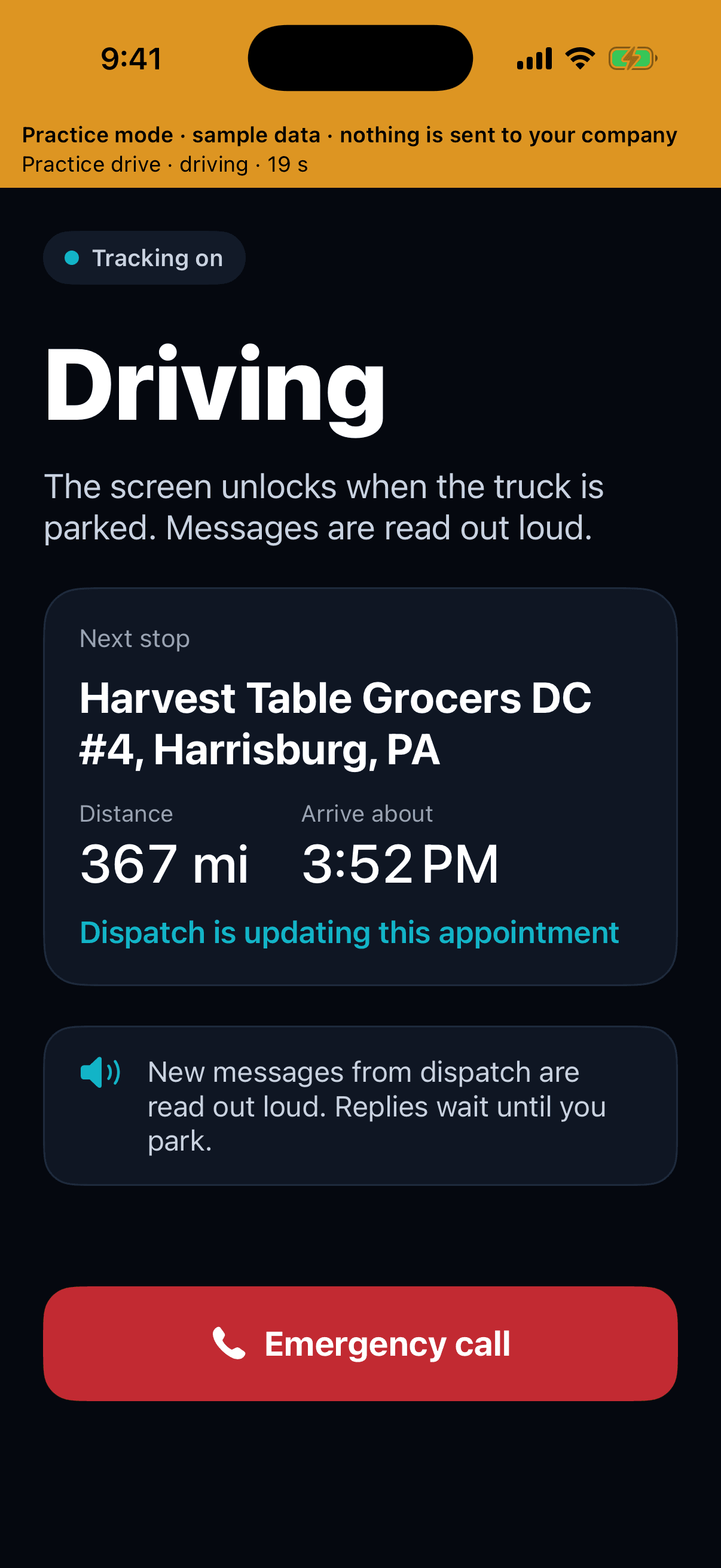
Shown in the app’s practice mode with sample data
Network & customer portal
Your customers see their freight. On your brand.
Give shippers and brokers a tracking view without the phone calls — and trade loads with other enrolled carriers on the network — free to join.
ForSales · Customer service
- White-label customer portal with signed tracking links.
- Load board network across enrolled carriers: postings, driver claims and recurring lanes.
- Lane benchmarks from aggregated, de-identified data — only for carriers that enroll.
- Joining and posting is free on every plan. An outside network driver who works for you is $20 for the month, however many loads; drivers never pay, and Haulbeam never takes a share of the rate.
Shipment
LD-418040 · PO 4500018842
- Picked up7:48 AM · Obetz, OH
- In transitLast position 11:42 AM
- DeliveryAppointment 2:00 PM
Illustration · simulated carrier
Web · Windows · Mac · iPhone
The same operation, wherever you are.
The web and Windows app for the dispatch floor, a native Mac app, an iPhone app for the office on the move, and Haulbeam Driver in the cab — one account, one data store.
Get the apps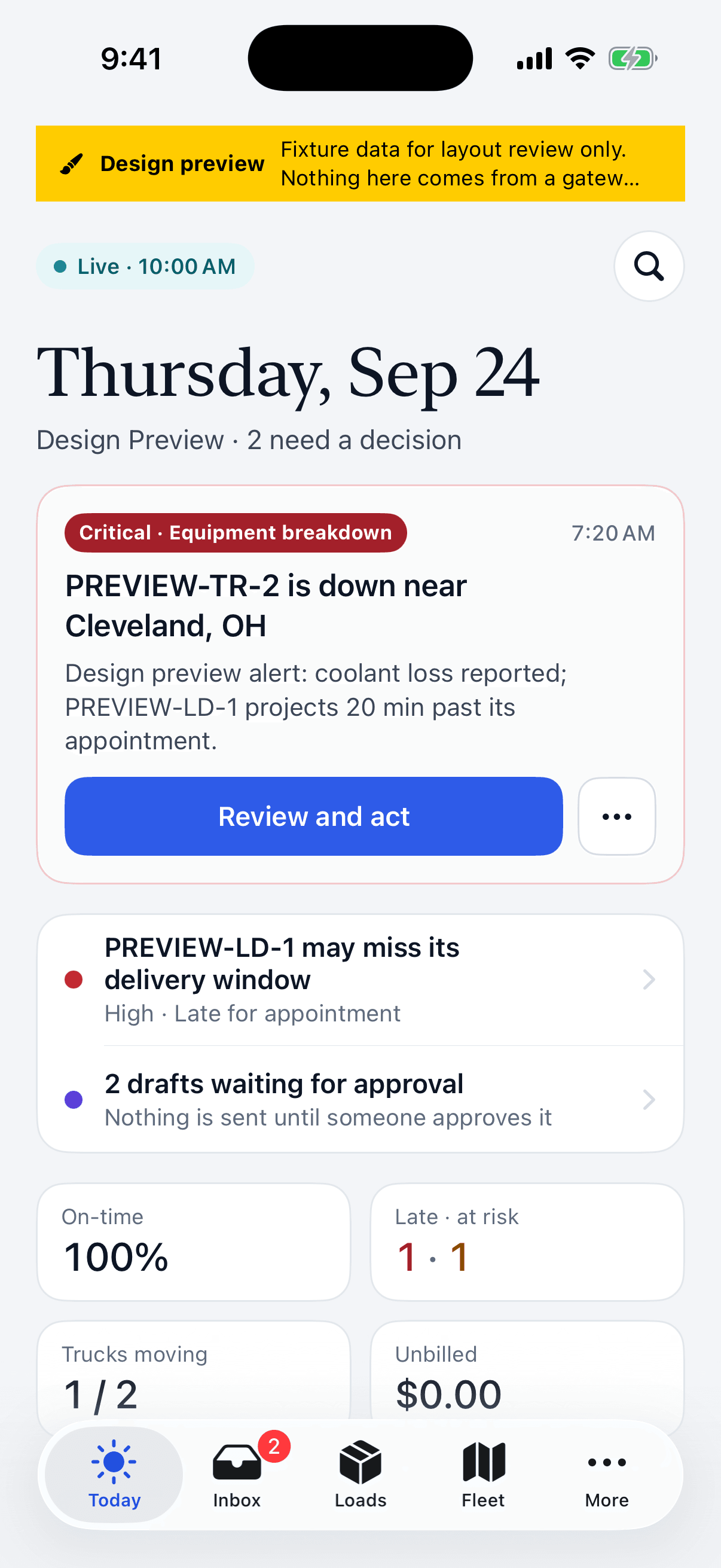
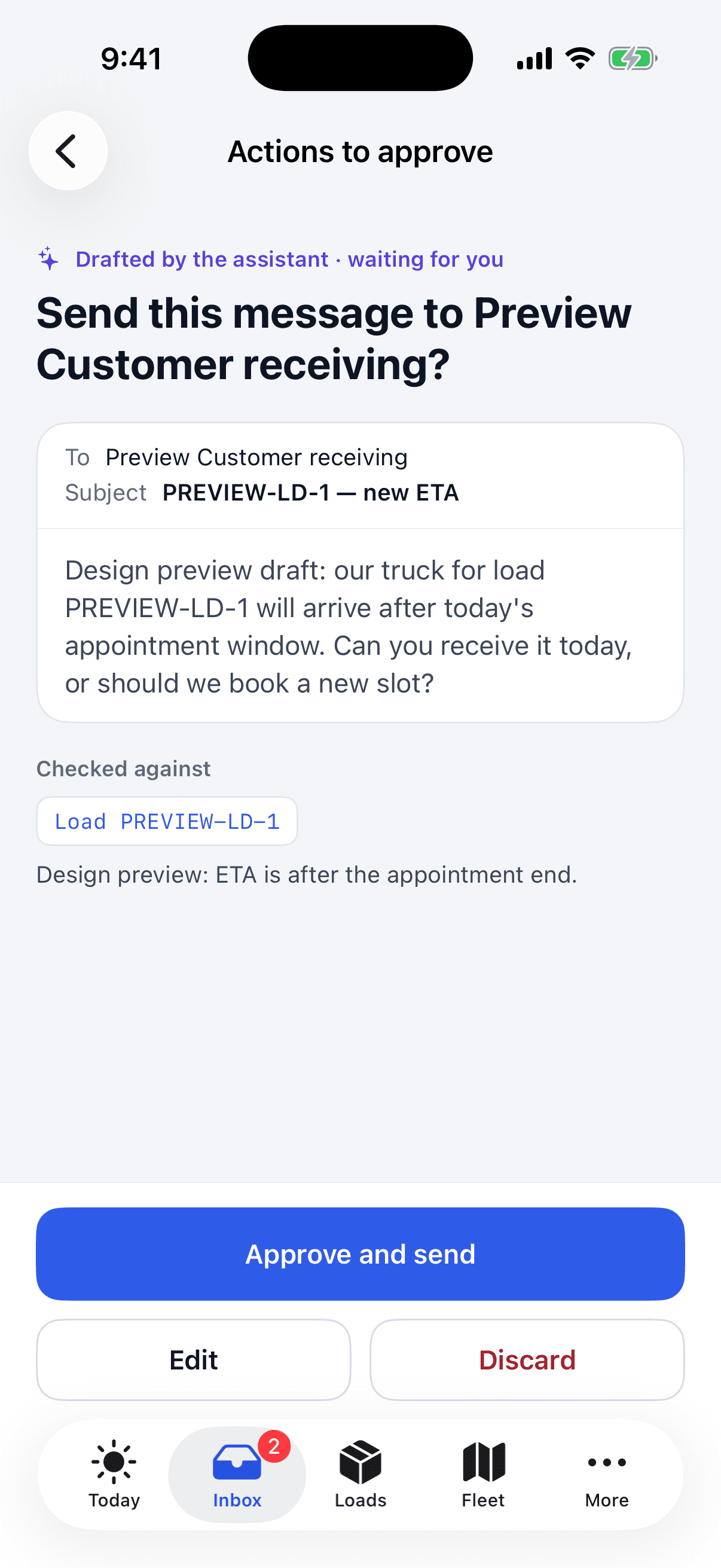
iPhone app shown with design-preview sample data
Honest limits
What Haulbeam is not — yet.
We’d rather you hear it here than in month two.
- Not an ELD. Haulbeam is not an electronic logging device and not the hours-of-service record of legal truth. It reads your ELD.
- Not built yet: driver pay settlements; a truck-routing provider (until a routing account is connected, routing ETAs are estimates); AS2 and Kafka connectors; SMS for drivers without smartphones.
- Connections are set up per customer. Real vendor API connections are configured during onboarding; some start with file or SFTP exports.
- AI can be wrong. That is why every important answer is cited and every drafted action waits for approval.

Founding Carrier Program
Be one of the first 25 carriers.
For carriers with 15–150 trucks that already run a TMS and an ELD. Founding pricing is locked for 24 months, the onboarding fee is waived, and you get a direct line to the founder.