
HaulBeam for the office
Run the office from one screen. Drivers on the app optional.
HaulBeam reads the TMS, ELD, EDI and accounting you already run. Dispatch sees what needs a decision. Billing sees the detention and extras that were never invoiced, with the proof. It works in any browser today, and it works whether or not your drivers ever install an app.
- Works in any browser today
- Keep your TMS and ELD
- Nothing sent without your approval
Two ways to run it
Office only works. Drivers make it stronger.
Start with the office alone. Everything in the “Office only” column runs on data you already have. When drivers join, HaulBeam adds their times to the same loads.
Without an ELD feed or the driver app, the map and late-truck alerts are only as fresh as your TMS check calls and EDI 214s. Money Desk still runs on everything you load.
Your raw data
Load what you already have. Keep every system.
HaulBeam doesn’t replace your TMS or ELD. It reads them, links every record to the load it belongs to, and keeps the original next to every number. Click any figure and you see the line it came from.
- Your TMSLoads, stops, appointments, customers and the stop times your team already enters.
- Your ELD or GPSTruck positions and geofence arrivals, read from the system you already pay for.
- EDI with shippers and brokers204 tenders, 214 status, 210 invoices and 990 responses.
- Accounting and ARInvoices, open and past-due receivables, short pays.
- Customer terms and paperworkFree time, detention rates, rate confirmations, signed in/out sheets, BOLs and PODs.
- Fuel cards, maintenance, driver filesFuel buys, service due, credentials that expire.
How it arrives: CSV exports, EDI files, JSON or XML feeds, or a scheduled SFTP drop. PDFs and photos are kept as evidence, and a person confirms what they say. Your data is yours to export any time.
Dashboard & dispatch
What needs you now, and why.
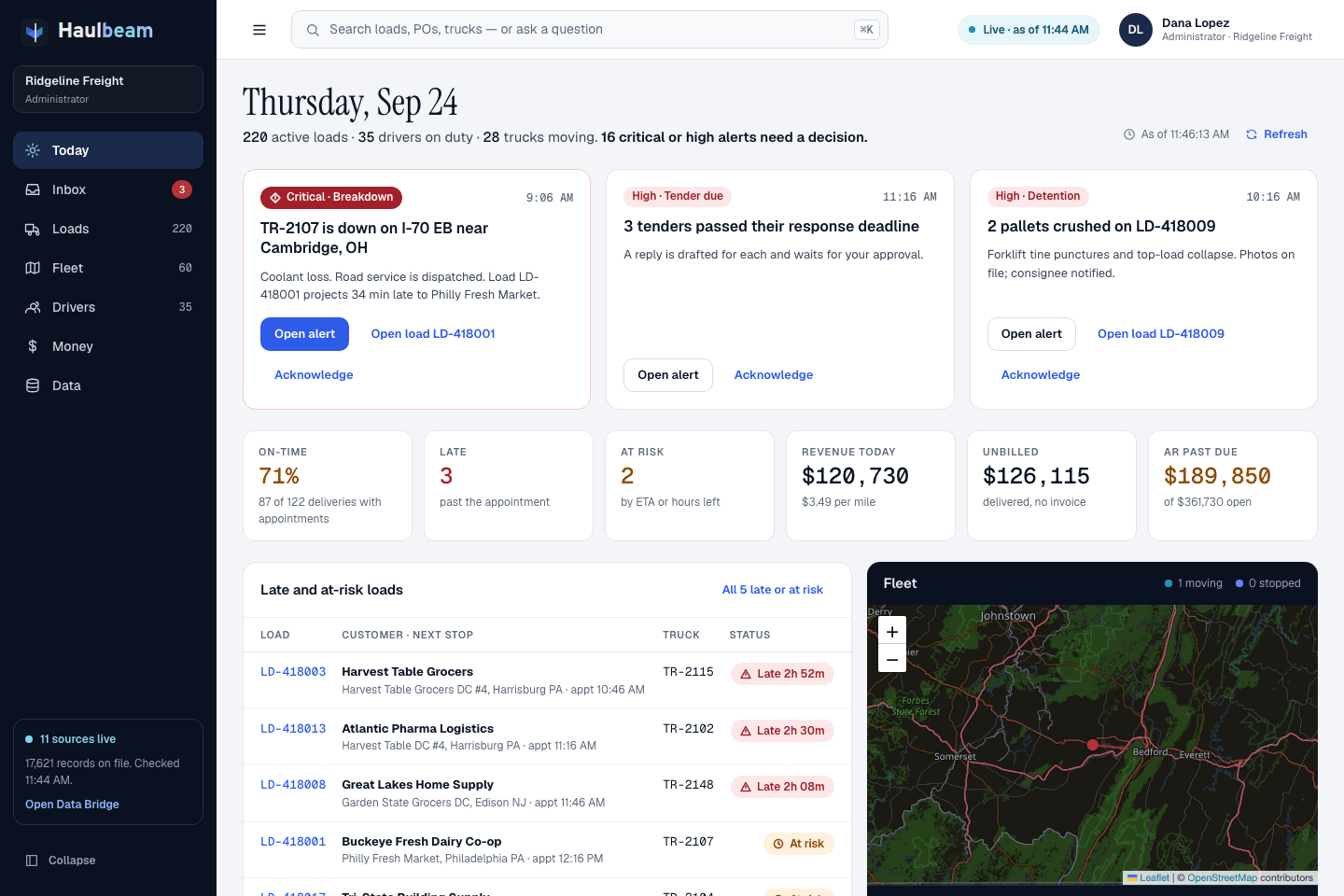
Open HaulBeam and the day is sorted. The few things that need a person come first, with the button that fixes them. Then the numbers, then the loads.
ForOwner · Dispatch
- Today. Decision cards, then on-time %, late, at risk, revenue today, unbilled and AR past due.
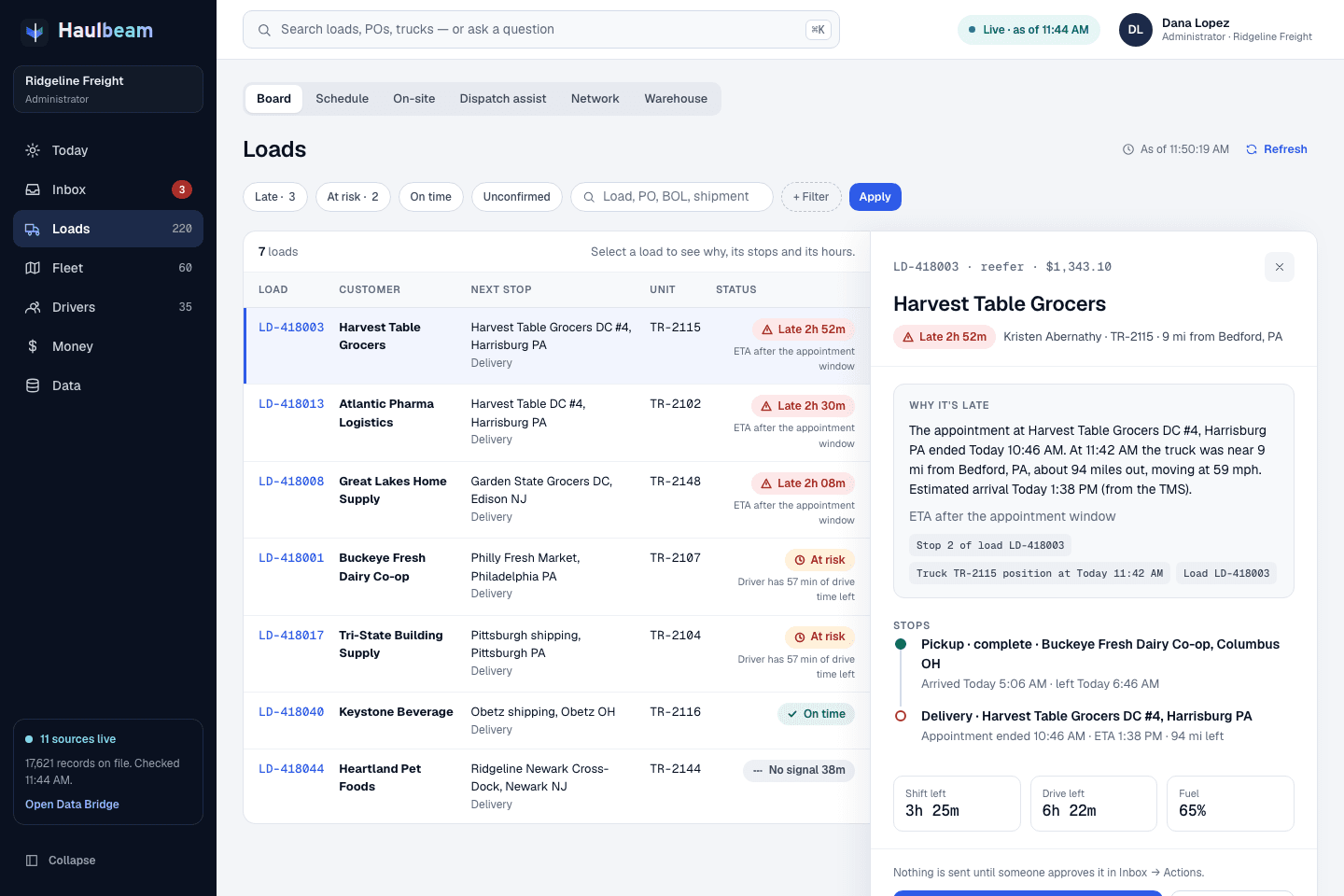
- Loads board. Late, at risk, on time, unconfirmed. Open a load to read why it’s late in one sentence.
- On-site and detention board. Which trucks are sitting at a shipper or receiver right now.
- 16 alert rules for breakdowns, late appointments, hours shortfalls, reefer temperature, tenders due, credit holds, expiring credentials and more.
- Customer e-mail inbox tied to the loads each message is about, plus fleet, schedule and maintenance.
Money & detention
Get paid for the work you already did.
Money Desk checks every delivered load against your customer’s terms, the rate confirmation, the stop times and the paperwork. When something was earned and never billed, it shows up with the evidence attached, ready for billing.
26 rules, including
Built for billing and AR
Illustration · simulated carrier · not customer data
Detention, from the data you load
For each stop, HaulBeam takes the arrival, the departure and the appointment, subtracts your customer’s free time, and prices what’s left at the rate in their terms. It does this per stop, so detention billed at delivery never hides detention you missed at pickup.
Pickup stop · simulated carrier · TMS times
Drivers are detained at 39.3% of stops, and fleets get paid on fewer than half of the detention invoices they send. ATRI, “Driver Detention” research, September 2024
Every finding says how strong its proof is
- Signed in/out sheetStrongestThe facility’s own times on a document the office has confirmed.
- Driver app geofence + tapOnly when drivers use HaulBeam Driver.
- ELD / GPS geofenceFrom your telematics, within about five minutes.
- EDI 214 status timeWhat you already send your customer.
- TMS stop timeWhat dispatch typed in.
- Office entry, with a reasonWeakestKept, labeled and never passed off as stronger proof.
When two sources disagree by more than ten minutes, HaulBeam flags it instead of picking the bigger number.
The AI you can add
AI that explains. Code that does the math.
Every number in HaulBeam is computed by code from your records. The AI ranks, explains and drafts. It never invents a figure, and it says “unconfirmed” when the data isn’t there.
- Ask from any screen. “Where is PO 4500018842?” The answer shows the records it used.
- Drafts, not sends. The customer e-mail, the detention notice, the EDI 214 or the 990 waits in Inbox → Actions until a person approves it.
- HaulBeam Watch keeps checking your records every 15 minutes through the working day and in a deep pass at 3 am, then sends a 6 am Money & Ops brief.
- An off switch. An administrator can stop the AI with one button. Numbers, alerts and checks keep running.
Connect your company’s own AI account
Your company’s account is always asked first. Every answer says which AI wrote it, and if one doesn’t answer, the next one takes over and the screen tells you.
With no AI connected at all, every number, alert and Money Desk finding still works, in plain fixed wording.
Names are trademarks of their owners. HaulBeam is not affiliated with them.
AI answers can be wrong. That’s why every important answer is cited and every drafted action waits for approval.
Not ready for a driver app?
HaulBeam is still a great fit.
- 01The money is in the office already.Detention, lumpers, TONU and short pays are found in stop times, terms and invoices you already have. Money Desk doesn’t need a phone in the cab to read them.
- 02Your ELD already knows when trucks arrive.HaulBeam reads the geofence times from the ELD or GPS you already pay for and uses them as detention evidence.
- 03The best proof is paper anyway.A signed in/out sheet beats any phone ping. The office uploads it, confirms the times, and it goes to the top of the evidence.
- 04Nothing to roll out to drivers.No installs, no phones to manage, no training in the yard. Your drivers keep working the way they do today.
- 05Add drivers later, lose nothing.When you’re ready, hand out activation codes. Same account, same loads, same history. Their times simply become stronger evidence.
Your first weeks
Start in the office this week.
No migration and no new hardware. Founding Carriers get hands-on onboarding from the founder.
- 01Open it in a browserThe web app runs today on any computer. No install and no IT project.
- 02Load what you already exportCSV exports from your TMS and accounting, EDI files, or a scheduled SFTP drop. API connections come later.
- 03Run Money Desk on historyPoint it at your last 90 days of loads and see what was earned but never billed, with the proof.
- 04Run the day from TodayDispatch and billing work from one screen. Drivers can join whenever you decide.

Founding Carrier Program
Be one of the first 25 carriers.
For fleets of every size, from a few trucks to 150 and up. Founding Pro is $599/mo + $45 per truck, locked for 24 months, with the driver app included and the onboarding fee waived. And you get a direct line to the founder.