Now enrollingFounding Carrier Program · 25 carriers · pricing locked 24 months

The operating system for trucking companies.

Haulbeam sits on top of the TMS, ELD, EDI and accounting you already run. Dispatch sees late loads before your customer calls. Billing collects the detention you already earned. Every number links to where it came from.

  • Keep your TMS and ELD
  • Driver app included per truck
  • 14-day free trial
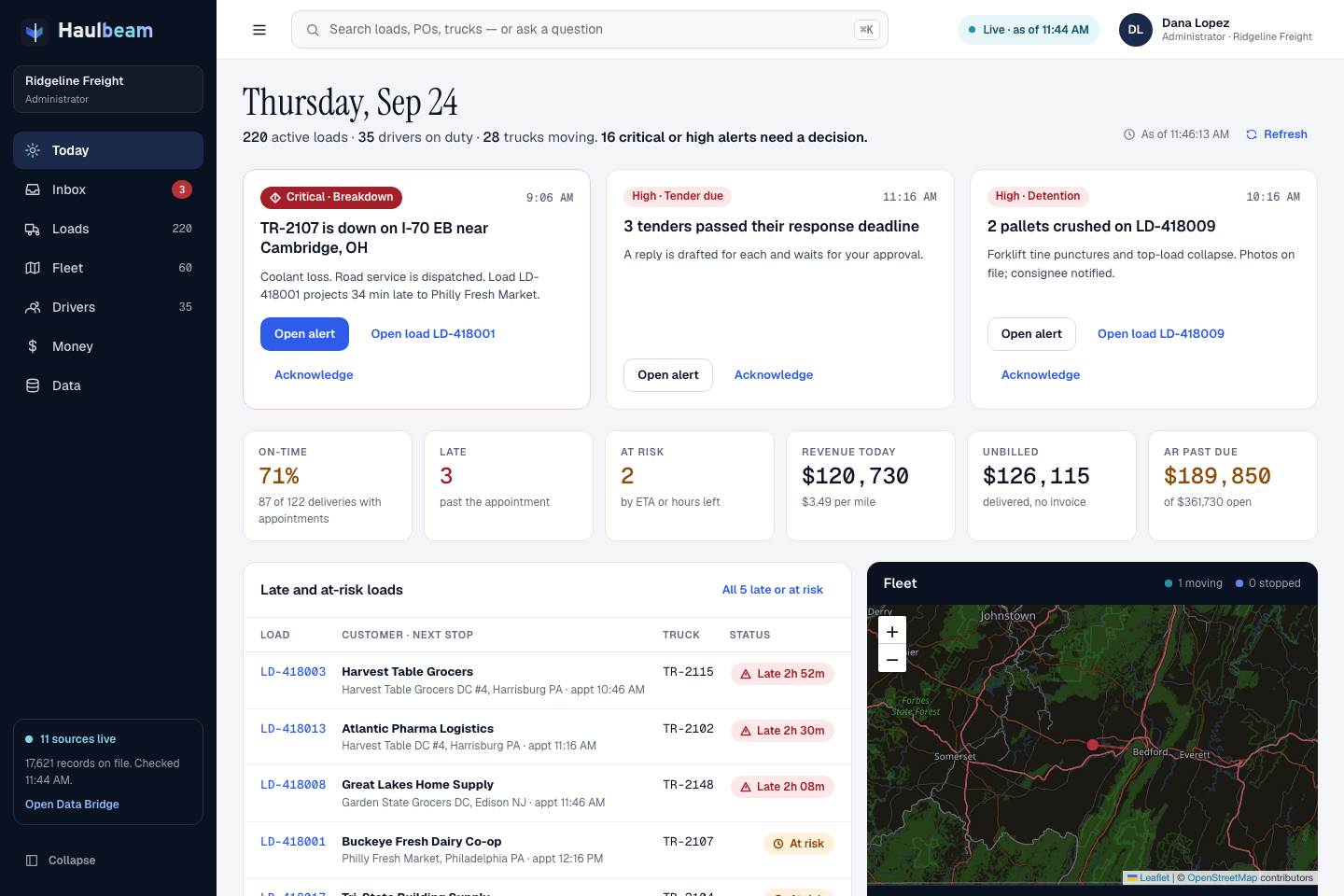
Haulbeam Today screen for a simulated carrier: decision cards for a breakdown, tenders past their deadline and crushed pallets; KPIs for on-time, late, at risk, revenue, unbilled and AR past due; late loads and a fleet map.
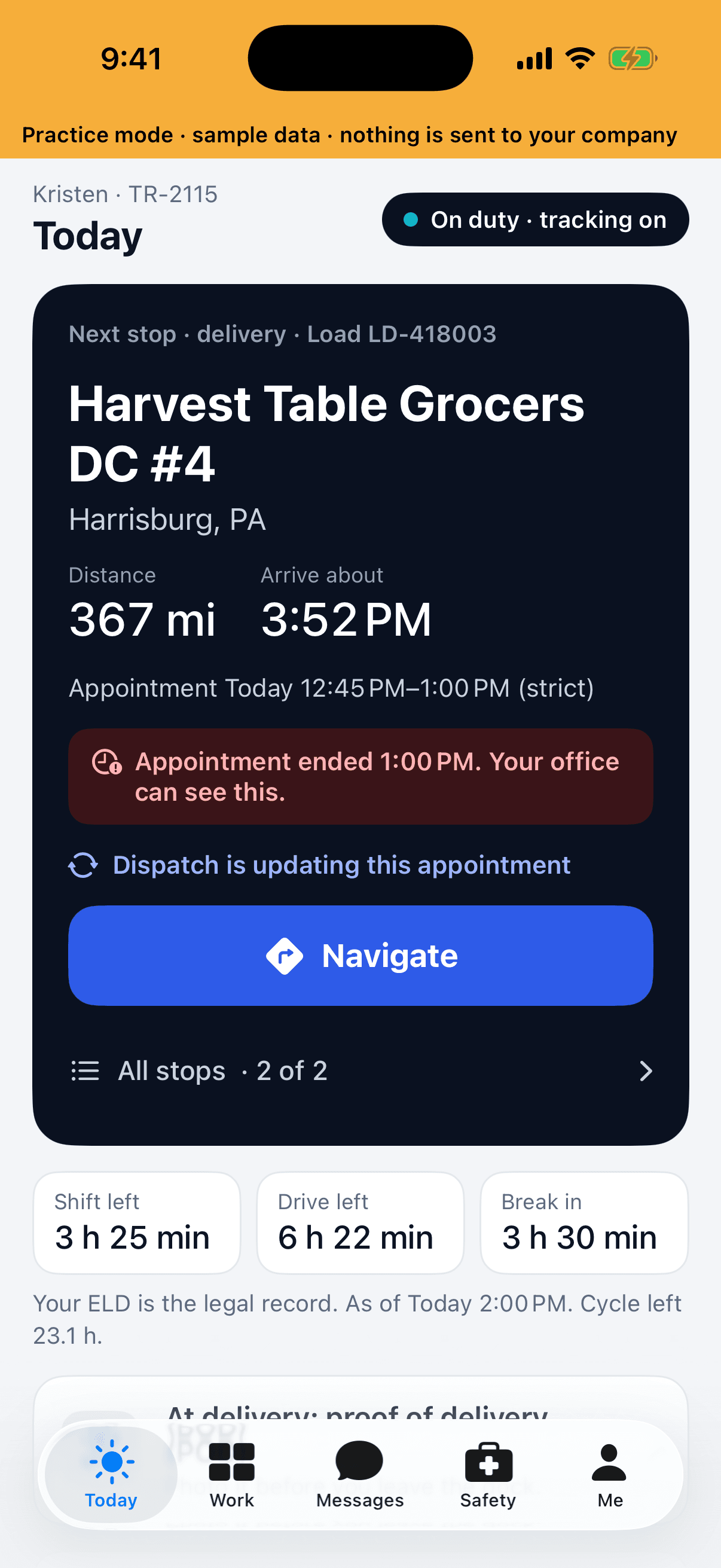
Haulbeam Driver Today screen: next stop Harvest Table Grocers DC #4 in Harrisburg, PA, with distance, arrival time, an appointment warning and a Navigate button.

Shown with a simulated carrier

Tested end to end · simulated 60-tractor carrier

We built a full carrier — “Ridgeline Freight” — and loaded its exports through the real engine. It is a simulation, not a customer.

Files from 12 systems
61
Records loaded, 17,609 valid
17,621
From upload to one live picture
36s
Flagged for review — each a real defect in the source file
10

What Haulbeam does

Fewer surprises. More money collected.

Three things change when the whole operation lives in one live picture.

See problems before your customer does.

Sixteen alert rules watch for breakdowns, late appointments, hours shortfalls, reefer temperature, detention, tenders due, tracking gaps, credit holds and more — each with the reason and the next step.

The Today screen

Get paid for work you already did.

Money Desk runs 26 rules across detention, layover, TONU, lumpers, accessorials, fuel surcharge, short pays and invoices never sent — every finding with its proof attached.

Money Desk
  1. LoadLD-418003TMS
  2. Stop 2Harrisburg, PAEDI 204
  3. TruckTR-2115ELD / GPS
  4. DriverK. AbernathyDriver file
  5. InvoiceDraftAccounting
  6. EvidencePOD photoDriver app

One live picture across TMS, ELD, EDI and accounting.

Every record is cleaned and linked — load to stops to truck to driver to invoice to evidence. Click any figure and see the source line it came from.

What it connects to

Examples from a simulated carrier

Built for every seat

One system. Every seat in the operation.

Dispatch, billing and drivers work from the same live records — each sees what they need first.

An operations control room with a wall of screens and staff at their desks.

Dispatch & operations

See the whole fleet before the phone rings.

Late and at-risk loads with the reason, breakdowns, tenders due and detention running — each with the next step on the card.

The Today screen
A finance professional checking invoices with a calculator at his desk.

Billing & finance

Invoices out with the proof attached.

Money Desk finds unbilled detention, accessorials and short pays, and hands billing the evidence to collect.

Money Desk
A truck driver in the cab, looking out of the window.

Drivers

One clear next stop. No calls to ask.

Haulbeam Driver shows the next stop, hours left and the paperwork due — and records arrival times that protect detention pay.

Haulbeam Driver

Stock imagery via Pexels — Truck video: Alex Kad · Control room: Kiwi and Camera · Finance: RDNE Stock project · Driver: Gustavo Fring. People shown are models, not Haulbeam customers.

The office app

The whole day on one screen.

Web, Windows and Mac. Built for owners, dispatch, billing and safety — each sees what they need first.

  1. 01

    The day, sorted by decision.

    Breakdowns, reefer alarms and drivers short on hours come first, each card with its next step.

  2. 02

    Why it’s at risk, in one sentence.

    Open any at-risk load and read the reason, with the records behind it.

  3. 03

    Every truck, live.

    Filter to late and the map refits. Click a truck for its driver, hours left and next appointment.

  4. 04

    Detention, while the truck is still there.

    The clock, the free time and the dollars running. Draft the detention notice for approval before the truck leaves.

  5. 05

    The math behind every dollar.

    A finding shows its formula, the sealed evidence and the customer’s own terms.

  6. 06

    Nothing goes out until you approve.

    Draft the charge, see exactly what will be sent, then approve it.

Real screen recordings · simulated carrier · not customer data

Works with what you run

Keep your TMS. Keep your ELD. Connect them in days, not months.

Haulbeam reads the systems you already pay for and adds the live picture and the money checks they don’t do. Nothing has to be replaced.

  • TMSYour current TMS — exports, SFTP or API
  • ERP & accountingMicrosoft Dynamics 365 and accounting exports
  • ELD / GPS & reefer telematicsPositions, hours, reefer set point and return air
  • EDI trading partners204 tenders · 214 status · 210 invoices · 990 responses
  • Warehouse (WMS)Cross-dock and warehouse activity
  • Maintenance (CMMS)Work orders and service due
  • Fuel cardsFuel transactions for the fuel desk
  • HRIS & driver filesDrivers, credentials and expirations
  • Safety & claimsIncidents and OS&D claims with photos
  • Customer-service mailboxCustomer e-mails linked to the loads they’re about
  • Weather & 511Conditions along the lanes you run
  • Files you already haveCSV, spreadsheets, e-mails and PDFs

One live picture

Cleaned, linked, and traceable to the source line

  • Loads
  • Stops
  • Trucks
  • Drivers
  • Invoices
  • Evidence

Every figure opens its source

Connections are set up per customer during onboarding. Many start with the file or SFTP exports your systems already produce; API connections follow. System names are listed to describe compatibility — they are trademarks of their owners, and Haulbeam is not affiliated with them.

Money Desk

Get paid for the detention you already earned.

Detention is time your drivers already spent and your customers already owe. The industry’s own research shows how much of it goes uncollected:

39.3%

of stops: that’s how often truck drivers are detained.

94.5%

of fleets bill for detention — yet they get paid on fewer than half of those invoices.

117–209

hours per driver per year lost to detention.

Source: ATRI, “Driver Detention” research, September 2024

26 rules. Every finding with its evidence.

Money Desk checks every delivered load against your customer terms, rate confirmations, driver-app arrival times and paperwork — then hands billing a finding it can act on.

  • Detention and layover not billed, with arrival and departure times captured automatically by the driver app
  • TONU, lumpers and accessorials missing from the invoice
  • Fuel surcharge and invoice mismatches against the rate confirmation
  • Short pays and delivered-not-invoiced loads, before month-end
Detention not billedLD-418040

Keystone Beverage · pickup at Obetz, OH

  1. Appointment8:00 AMEDI 204 tender
  2. Arrived7:48 AMDriver app · automatic
  3. Departed11:05 AMDriver app · automatic
  4. Free time2 hCustomer terms
  5. Billable detention1 h 05 mFrom appointment time, after free time
  6. On the invoiceNot billedAccounting
Signed BOLStop 1 of LD-418040Customer terms

Illustration · simulated carrier · not customer data

Haulbeam Watch

Watch finds the money. And shows the math.

Watch reads your loads, stops, invoices, fuel and hours around the clock. It finds money you’re owed, money you’re losing, ways to save and service at risk — and shows each one with the formula, the records behind it and what to do next.

Screen recording · simulated carrier · not customer data
What the recording shows

Screen recording of the Haulbeam web app with a simulated carrier, Ridgeline Freight. It moves from the Loads board to the Today screen, where the Haulbeam Watch card shows what Watch found this week, split into data that hides money, losing money, missing money, ways to save and service risk, with its top three items. It then opens the Watch page, with what Watch found this week, how many findings are open and the list of findings by kind. One finding, “Detention you earned but did not bill”, shows the formula for one stop worked out from the arrival, appointment and departure times and the customer’s free time and hourly rate, the stop records behind it, what to do, an integrity check that passed, what to measure, and a button that prepares the detention charges for approval.

What Watch looks for

  • Missing money

    Detention, stop-offs, lumpers and fuel surcharge never billed. Short pays. Loads delivered but not invoiced. Loads turned down while trucks sat idle.

  • Losing money

    Customers and loads that lose money. Fuel bought above your usual price. Docks that keep trucks waiting. Fuel-card purchases that don’t add up.

  • Ways to save

    Empty miles, idling, and part-loads that would fit in one trailer.

  • Service risk

    On-time below target, and where it clusters. Loads that can’t make the next stop on the hours left. Freight moving for customers on credit hold.

  • Data that hides money

    Records that keep money out of sight — like carrier pay never entered on a brokered load, so the margin looks better than it is.

Every finding comes with

  • The reason, with the formula worked out from your own records.
  • The money at stake, and how sure Watch is: worked out, partly estimated or an estimate.
  • The records behind it, each one a click away.
  • What to do next. When there’s a charge or a message to send, a button prepares the drafts — nothing goes out until a person approves.
  • An integrity check. Safety, hours of service and other legal rules, customer commitments, drivers’ fair pay and honest records are never traded for a saving.
How Watch works
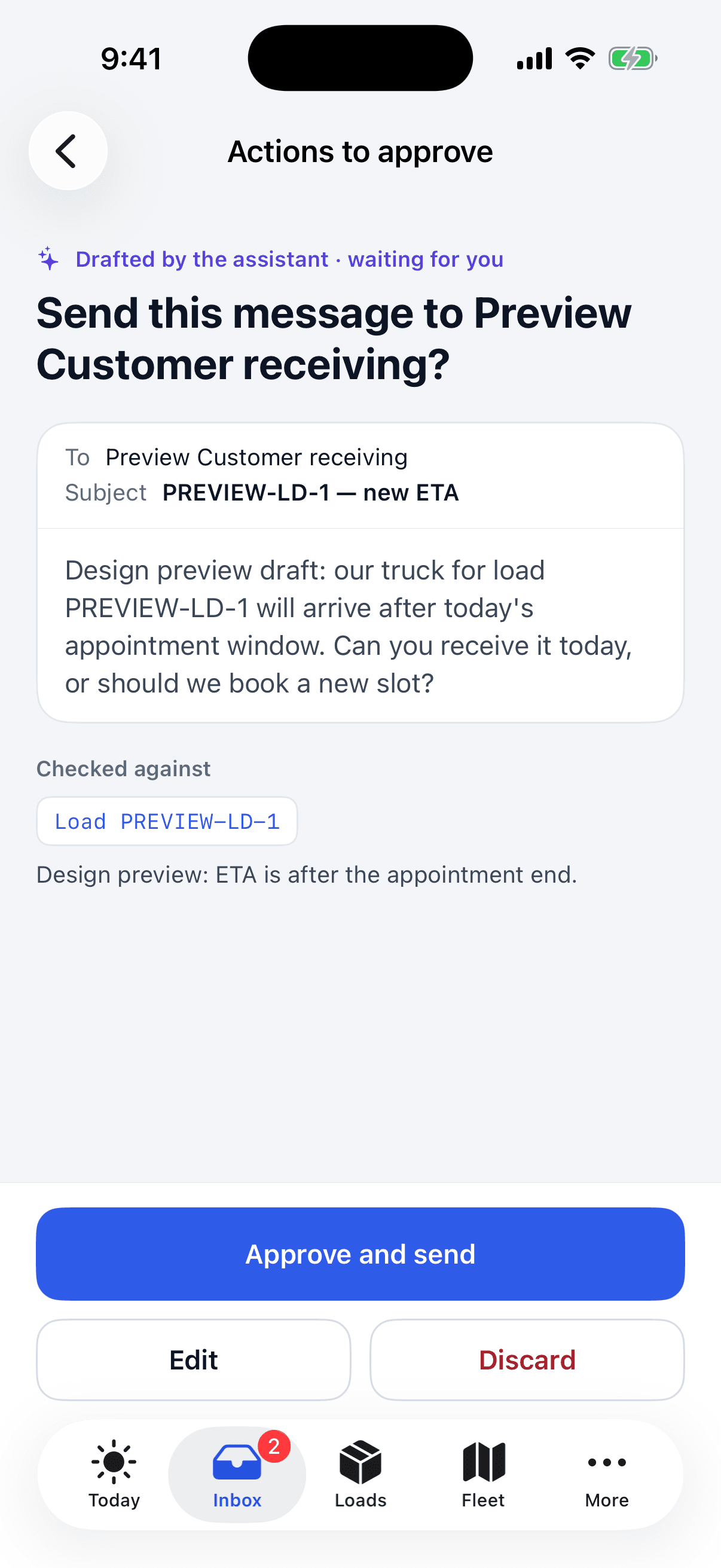
Haulbeam iPhone app: a message drafted by the assistant waiting for approval, with Approve and send, Edit and Discard buttons and the load it was checked against.

Assistant & approvals

AI you can check.

Ask where a load is, why it’s late or what’s unbilled. Haulbeam answers from your own records and shows which ones it used.

  • Every answer shows its sources. Click through to the load, stop or truck position it came from.
  • It says “unconfirmed” when the data is missing — instead of guessing.
  • Nothing goes out without your approval. Haulbeam drafts the customer e-mail, the EDI 214 status or the 990 tender response; a person approves, then it’s delivered.

AI answers can be wrong. That’s why everything important is cited and approval-gated.

Shown with a simulated carrier and sample data

Haulbeam Driver · iPhone

The app drivers actually keep.

It replaces calls and paperwork instead of adding to them — and it respects the driver’s time off.

  • Tracking only on duty. A visible “tracking on” pill, always. No off-duty tracking, ever.
  • Automatic arrival and departure with detention timers at every stop — the times that protect the driver’s detention pay.
  • Photos instead of faxes. Bills of lading, proof of delivery and receipts from the phone.
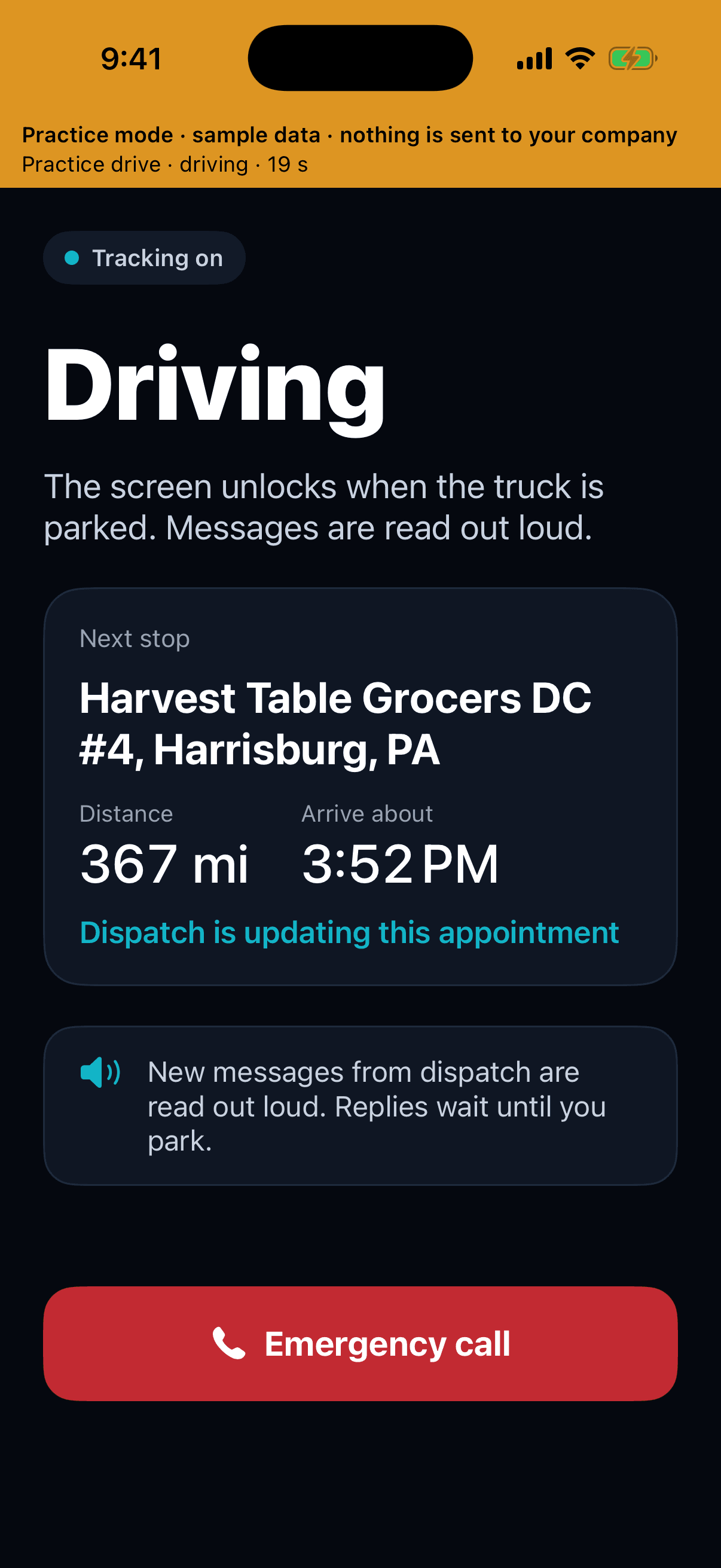
  • Safe while moving. Messages from dispatch are read aloud and held until the truck is parked; the screen locks while driving.
  • “What my company sees.” One screen that shows the driver exactly what the office can see.
More about Haulbeam Driver
Haulbeam Driver Today: on duty, tracking on; next stop card with distance, arrival time and Navigate; shift, drive and break time left.
Haulbeam Driver in driving mode: large Driving title, next stop distance and arrival time, messages read aloud, and an Emergency call button.

Shown in the app’s practice mode with sample data

Security & trust

Your data stays yours.

Built in from the first line of code — and stated plainly, without certifications we don’t have.

  • Company-isolated data

    Each company’s data is kept separate from every other company’s, and a dedicated automated test suite checks that isolation.

  • Encrypted in transit

    Traffic between the apps and Haulbeam is encrypted, and requests are rate-limited to blunt abuse.

  • Malware-scanned uploads

    Files you and your drivers upload — exports, BOLs, PODs, receipts — are scanned for malware.

  • Append-only audit log

    A tamper-evident record of what happened in your account. Entries are added, never edited or removed.

  • You own your data

    Your data is yours. Export it at any time, and for 30 days after you leave.

  • No selling. No training.

    We don’t sell your data and don’t use it to train AI models offered to anyone else.

How we protect your operation

Everywhere your team works

One account. One source of truth. Five apps.

Get the apps
  • WebAny modern browser
  • WindowsDesktop app
  • MacNative app
  • iPhoneOffice app
  • Haulbeam DriveriPhone app for drivers

Founding Carrier Program

Be one of the first 25 carriers.

For carriers with 15–150 trucks that already run a TMS and an ELD. Founding pricing is locked for 24 months, the onboarding fee is waived, and you get a direct line to the founder.